Recipe box · Meal planner · Grocery list
Recipes, without the life story.
Dash saves recipes from websites, social videos and cookbooks, keeps them clean and easy to cook from, and turns your week’s plan into one grocery list, sorted by aisle.
For iPhone, iPad and Apple Watch
Save recipes from
- Safari
- Any recipe site
- TikTok
- YouTube
- X
- Cookbooks
- Recipe cards
- Screenshots
- Other recipe apps
Scan a recipe
Cookbook page in, recipe out.
Photograph a cookbook page, a recipe card or a screenshot, up to 5 pages, and Dash turns it into a recipe. It’s read on your iPhone, and your photos aren’t uploaded.
- Up to 5 pages. Recipes that run over a few pages come out as one recipe.
- Cookbooks, cards and screenshots. Use the camera, or pick photos you already have.
- Unsure amounts, shown in place. When Dash isn’t sure it read an amount correctly, it shows that line next to the part of the page it came from.
- Fix or confirm before you save. Tap the picture to see it larger, then correct or confirm the amount right there.
The free version includes 3 scans. Dash Pro has no limit.
-
Photograph the page
Up to 5 pages, from a cookbook, a card or a screenshot.
-
Dash reads it on your iPhone
Nothing is uploaded.
-
Check the unsure lines
Each one sits beside the part of the page it came from. Tap the picture to enlarge it.
-
Fix or confirm, then save
The recipe lands in your library.
01Save
Every website recipe, without the clutter.
Tap Share on a recipe page and Dash keeps just the recipe: ingredients, steps, times and a photo. No pop-ups, no scrolling past someone’s summer in Tuscany. Saving recipes from websites is free.
- Share from Safari or any app. Dash appears right in the share sheet.
- Paste a link. Use Import from Link on the Recipes tab.
- Browse and save. Look for recipes in the Browse tab and tap Save Recipe.
- Bring your library. Moving from another recipe app? Import everything in one go.
02Cook
Made for messy hands.
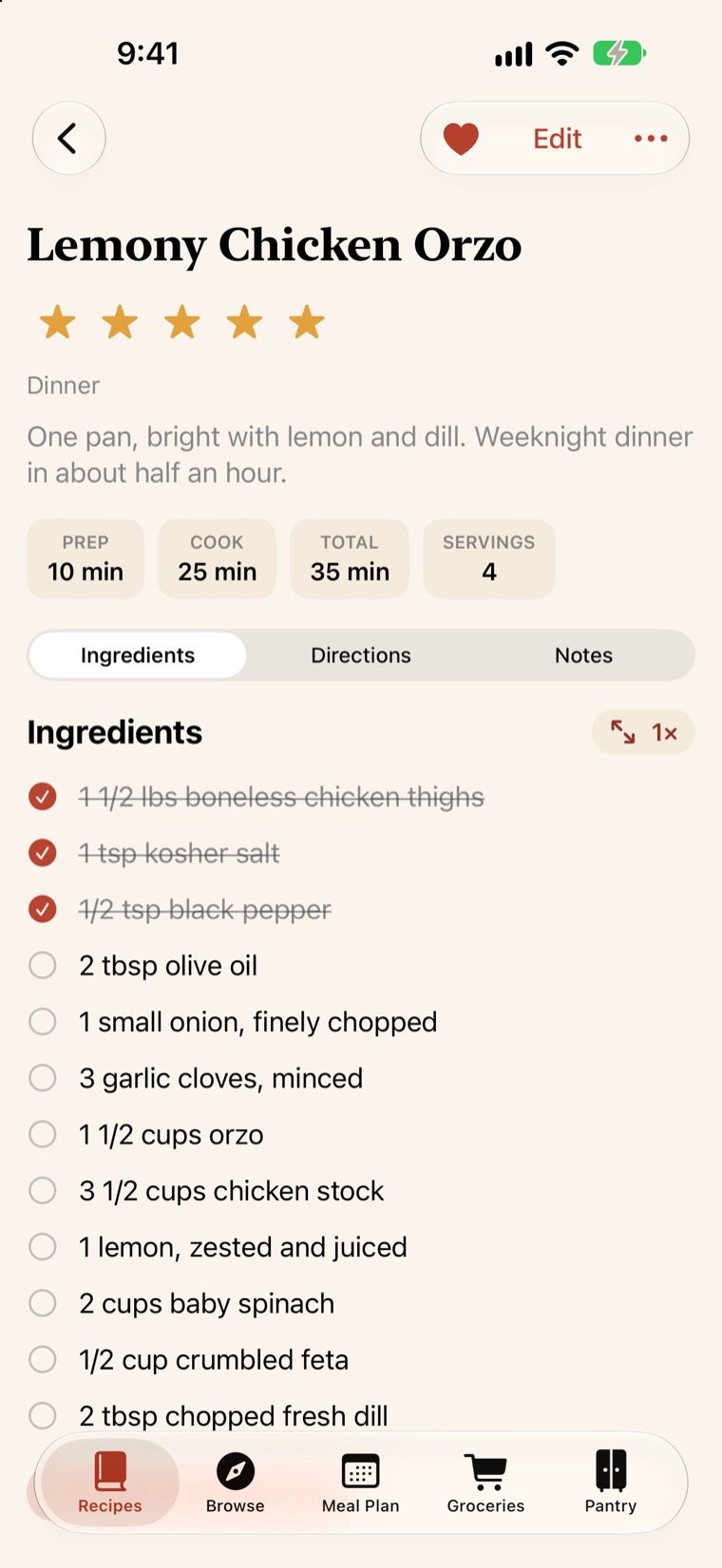
A calm, readable page that keeps up with you at the stove, and a screen that stays on while you cook.
- Tap a time to start a timer. “Simmer for 12 minutes” becomes a kitchen timer, with an alert when it’s done.
- Keep your place. Cross off ingredients as they go in, and tap the step you’re on.
- Scale any recipe. Halve it or double it, and the amounts follow, even “1-1/2 cups”.
- Estimate nutrition. Calories, protein and more for any recipe, worked out on your iPhone.
03Plan
Sort out the week by Sunday.
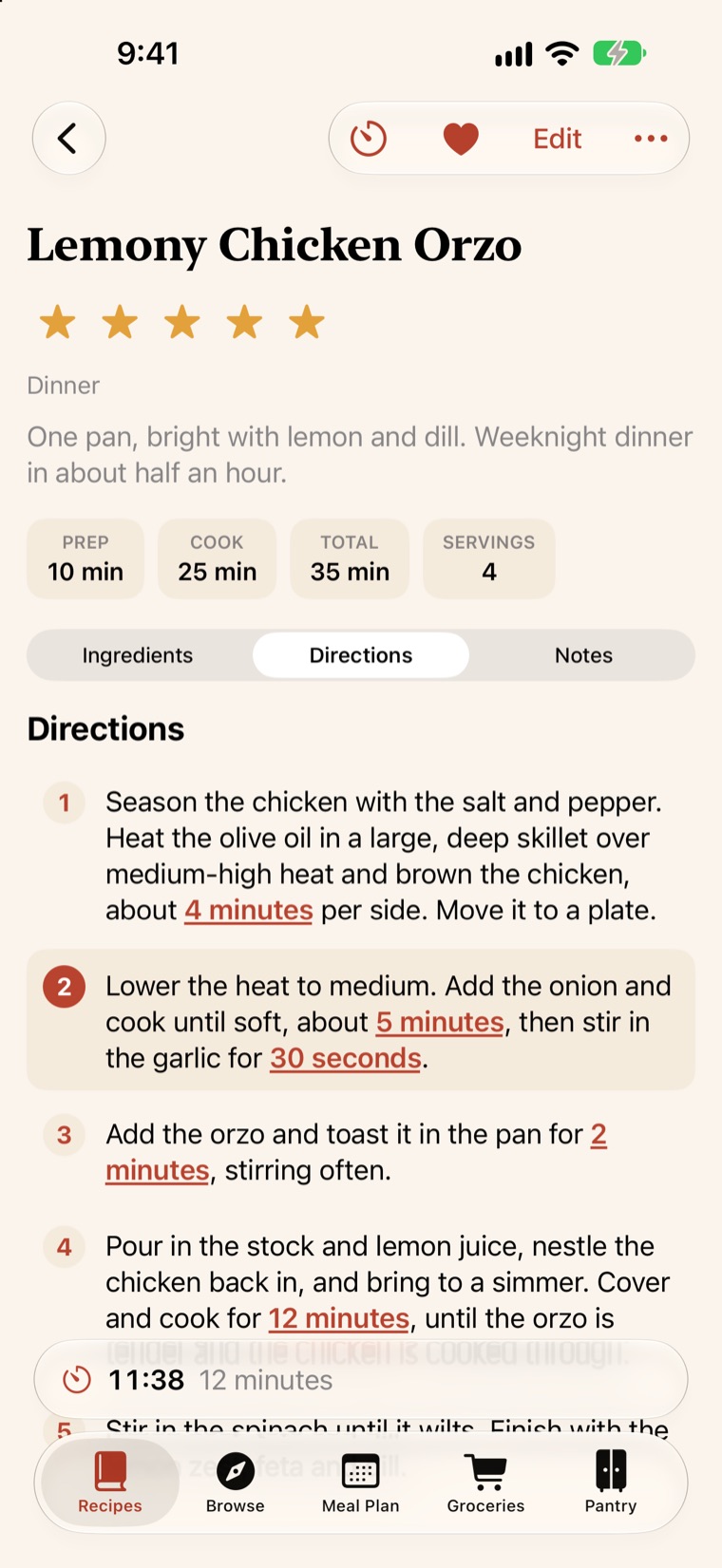
Drop recipes onto the days you’ll cook them, from Sunday pancakes to Tuesday tacos. Add a note for nights out or leftovers, and see what’s for dinner at a glance.
- Breakfast, lunch, dinner and snacks. Plan as much or as little as you like.
- Ask Siri. “What’s for dinner in Dash?”
04Shop
One list, aisle by aisle.
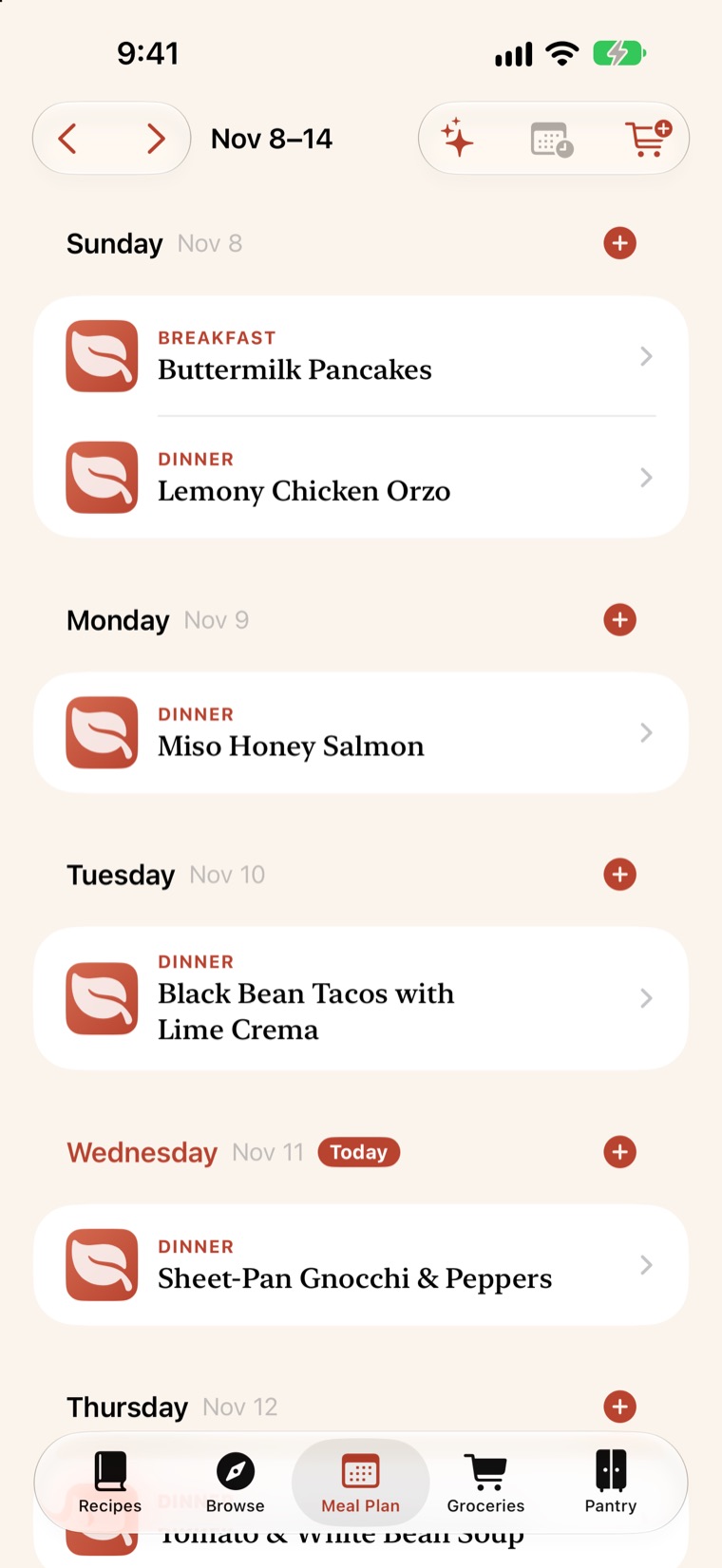
Add the whole week’s ingredients in one tap. Dash sorts them by aisle, so you can walk the store once and be done.
- No doubles. The same ingredient from two recipes becomes one line.
- Skip what you have. Items already in your pantry are left off or flagged.
- Check it off on your wrist. Your lists are on Apple Watch, too.
05Stock
Know what’s in the cupboard.
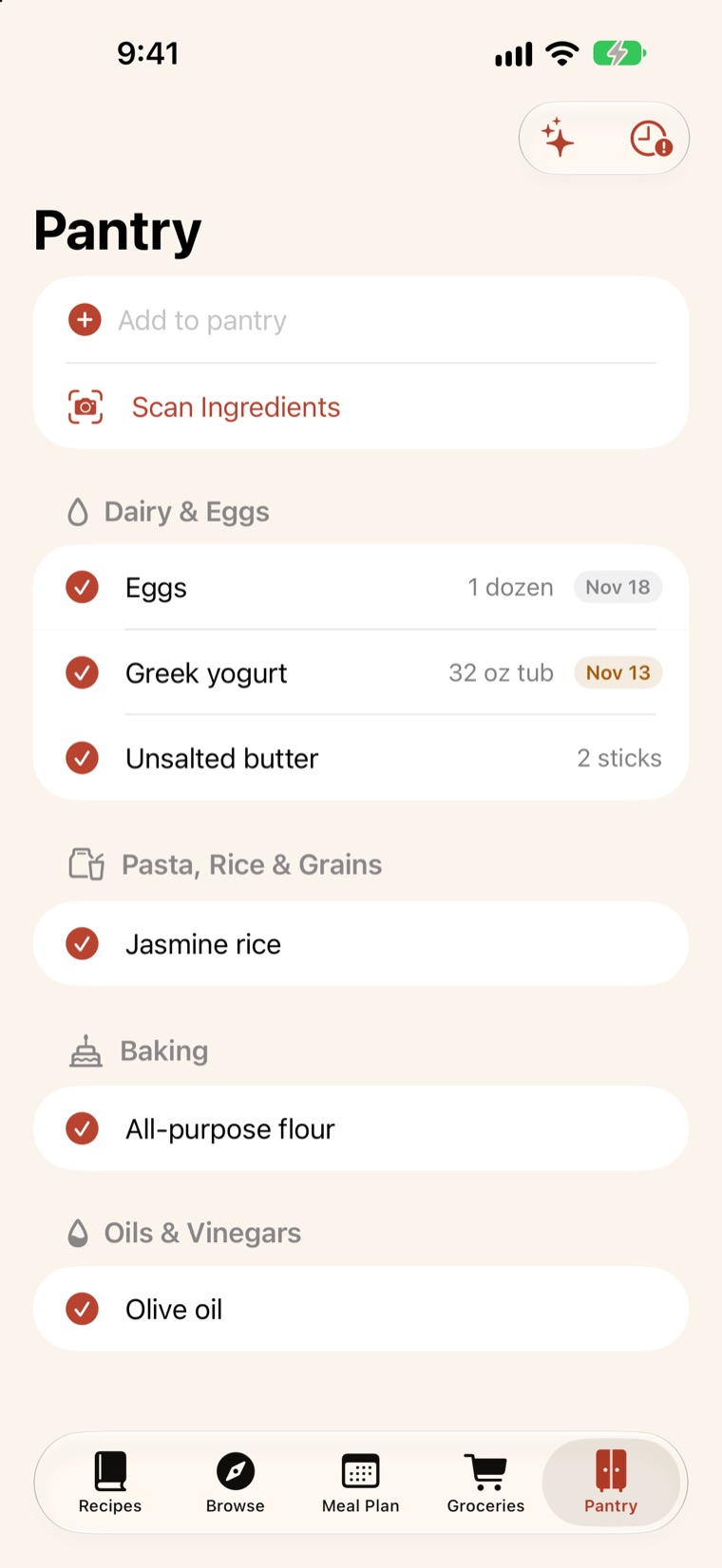
Keep track of what you have, how much is left, and what needs using up before it turns.
- Expiration dates. Dash flags what’s about to expire, and can show just those.
- Restock as you shop. Check off a grocery item and it can go straight into your pantry.
And all the little things.
-
Apple Watch
Your grocery list and the recipe you’re cooking, on your wrist.
-
Siri and Shortcuts
“Add Lemony Chicken Orzo to my grocery list in Dash.”
-
iPad
A roomy layout for your recipe library and plans, with a category column beside your recipes, kept in sync with your iPhone through iCloud.
-
Built-in browser
Look for recipes in the Browse tab and save them with a tap.
-
Kitchen timers
Run several at once, and get an alert even when Dash is closed.
-
Yours to keep
Export every recipe, photos included, whenever you like.
-
Quick categories
Change a recipe’s categories without opening the full editor.
-
Your language
In English, German, French, Italian, Spanish, Portuguese, Dutch, Swedish and Japanese.
Dash AI · Part of Dash Pro
A little extra help, when you want it.
Dash works beautifully on its own. Dash Pro adds Dash AI for the jobs that are tedious by hand.
-
Scan your pantry
Snap your shelves or fridge, and Dash adds what it sees.
-
What can I make?
Recipe ideas built around what you already have.
-
Plan with AI
A week of meals from the recipes you’ve saved and love.
Dash AI only sends what a feature needs, only when you use it, and only after you agree. How Dash AI handles your data
Free, and what Dash Pro adds
Start free. Upgrade if you want more.
Dash is free to download. Saving recipes from websites is always free.
Dash
Free
- Room for 15 recipes
- 3 imports from social posts
- 3 recipe scans
- Meal plan, grocery lists, pantry and timers
- iPhone, iPad and Apple Watch, synced through your iCloud
Dash Pro
$2.99 a month or $24.99 a year
- No limit on recipes, social imports or scans
- Dash AI: scan your pantry from photos
- Recipe ideas from what you have
- A week of meals planned from your saved recipes
- 7-day free trial
Billed through the App Store. The subscription renews automatically unless you cancel at least 24 hours before the end of the period, and you can cancel anytime in your Apple Account settings. Prices are for the US and vary by country.
Privacy
Your kitchen is your business.
Dash keeps your recipes, plans and lists on your devices and in your own iCloud. We don’t have a copy, and we don’t want one.
- No account. Open the app and start cooking. Your iPhone and iPad stay in sync through your own iCloud.
- No ads, analytics or tracking. And we never sell data.
- Scans stay with you. Dash reads cookbook photos and screenshots on your device. Your photos aren’t uploaded.
- Dash AI asks first. Nothing goes to Dash AI until you agree, and only what the feature needs.
Questions
Do I need an account?
No. Dash works the moment you open it. If you’re signed in to iCloud, it syncs through your own iCloud account, with nothing to set up.
Can I bring my recipes from another app?
Yes. Export your recipe library from your old app, then open the file with Dash, or go to Settings → Import Recipe Library.
Does Dash sync between my devices?
Yes. If you’re signed in to iCloud, your recipes, meal plan, grocery lists and pantry stay the same on your iPhone and iPad, automatically. They live in your private iCloud storage, where only you can see them. Apple Watch gets your grocery lists and recent recipes from your iPhone.
What does Dash cost?
Dash is free to download, with room for 15 recipes, 3 imports from social posts and 3 recipe scans. Saving recipes from websites is free. Dash Pro is an optional subscription, $2.99 a month or $24.99 a year with a 7-day free trial, billed through the App Store. It removes those limits and includes Dash AI.
Can Dash read a recipe from Instagram, TikTok, Facebook, YouTube or X?
Yes, when the recipe is in the caption or description, or on a recipe page the post links to: tap Share on the post and choose Dash. Dash can also read a recipe that’s only spoken in an Instagram, TikTok, Facebook or X video: the free version includes 3 imports from social posts, and Dash Pro has no limit. If the recipe is only shown on screen, take a screenshot and scan it. The saved recipe links back to the original post.
How does scanning work?
Photograph a cookbook page, a recipe card or a screenshot, up to 5 pages, and Dash turns it into a recipe. It’s read on your iPhone, and your photos aren’t uploaded. When Dash isn’t sure it read an amount correctly, it shows that line next to the part of the page it came from. Tap the picture to see it larger, then fix or confirm the amount before you save. The free version includes 3 scans.
Which languages does Dash speak?
English, German, French, Italian, Spanish, Portuguese, Dutch, Swedish and Japanese.

Get cooking.
Dash is coming soon to the App Store for iPhone, iPad and Apple Watch.
Coming soon to theApp Store
Recipes from social videos
Saw it in a video? Send it to Dash.
Share a post from Instagram, TikTok, YouTube, Facebook or X to Dash, or paste its link. Dash reads the caption and turns it into a recipe you can cook from. When the recipe is only said out loud, Dash writes it down.
The free version includes 3 imports from social posts. Dash Pro has no limit.